Customer Feedback Form Template (Free)
A free customer feedback form template you can copy today, plus the questions that work and the mistakes that kill response rates in hospitality.
By Sentoma · Last updated 21 July 2026
A good customer feedback form asks five questions or fewer, takes under a minute, and makes only the overall rating required. Below is a free template you can copy today, plus variants for hotels, restaurants and venues.
Key takeaways
- Five questions maximum: one required rating, everything else optional.
- Never ask for personal details before the feedback itself.
- Put the form where the experience happens - a QR code beats a link in an email.
- The form is the easy half; deciding who reads the answers every day is what makes it work.
The free customer feedback form template
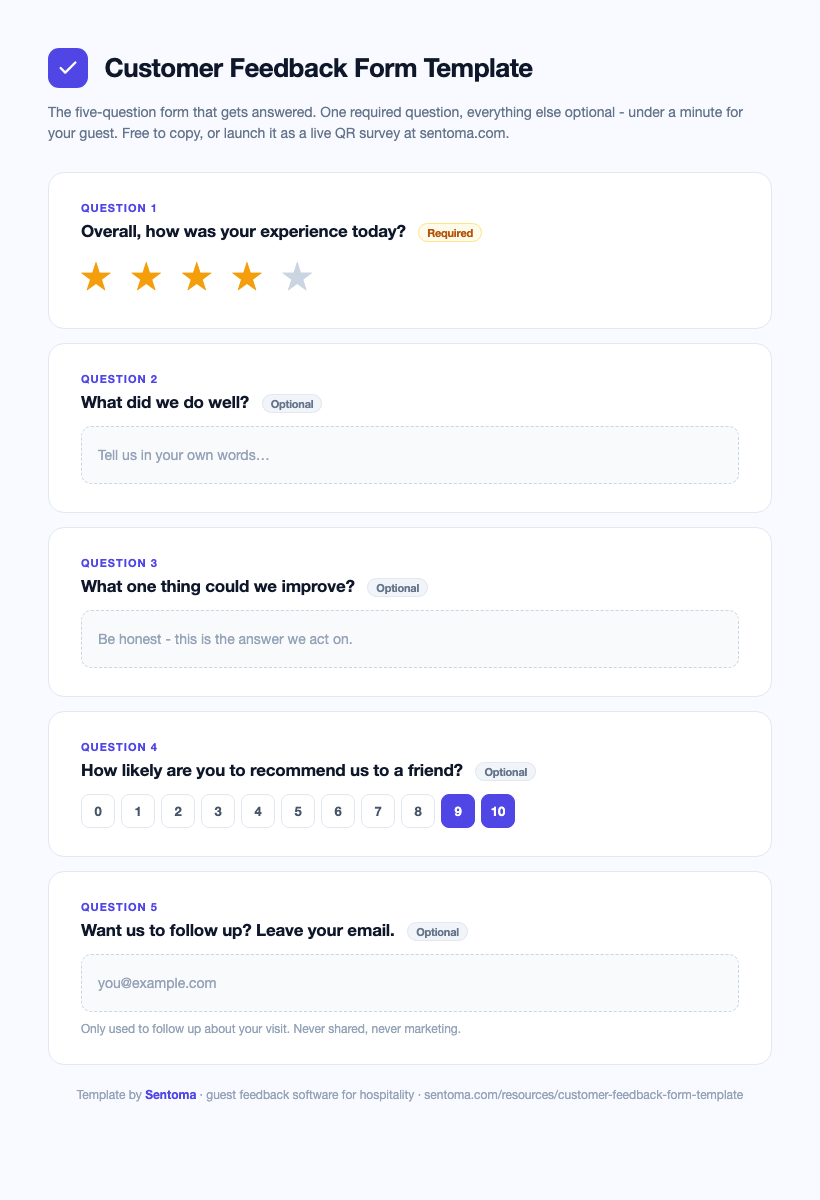
Download the template as a PDF - print it, share it with your team, or copy the questions below. Or skip the copying entirely and launch it as a live QR survey in Sentoma - free, with the five questions pre-loaded.
Copy this as your starting point:
- Overall, how was your experience today? (1-5 stars, required)
- What did we do well? (open text, optional)
- What one thing could we improve? (open text, optional)
- How likely are you to recommend us to a friend? (0-10, optional)
- If you'd like us to follow up, leave your email. (optional, with a one-line privacy note)
Why this shape works:
- One required question keeps completion rates high - every extra required field costs responses.
- The two open questions produce the comments you will actually act on.
- The 0-10 question gives you an NPS trend over time without a second survey.
- Contact last, always optional - asking for a name first is the fastest way to lose honest feedback.
Question variants by venue
Swap questions 2-3 for versions that fit your setting:
| Venue | Ask this |
|---|---|
| Restaurant or cafe | How was your food today? · How was the speed of service? |
| Hotel | How was your room? · How was check-in? |
| Golf club | How was the course today? · How was the clubhouse experience? |
| Event or venue | How was the event organised? · Would you attend again? |
For a deeper question bank grouped by category, see our guest satisfaction survey guide.
Formats: paper, PDF or digital?
- Digital via QR code - the strongest option. Guests scan at the table or in the room and answer in the moment; responses arrive instantly, tagged by location, with alerts for bad ratings. See how QR code feedback works.
- Web link - fine for post-visit emails and booking confirmations; weak as your only channel.
- Paper cards - familiar but slow: illegible handwriting, manual typing-up, and nobody is alerted when a guest has a problem right now.
- PDF forms - avoid. Nobody downloads, fills and returns a PDF in 2026.
The mistakes that kill response rates
- Too many questions. Ten questions can halve your completion rate versus three.
- Required everything. Each required field filters out another slice of guests.
- Asking days later. Feedback quality and volume collapse once the guest is home.
- Generic wording. "Rate our organisation's service delivery" reads like a council form. Write like a person: "How was your visit?"
- No follow-through. If nobody reads the answers each morning, guests notice - and stop answering.
From form to feedback system
A form collects answers. A feedback system acts on them:
- Route by rating. A happy guest gets invited to leave a Google review; an unhappy one triggers an instant alert to the manager on shift.
- Tag by location. One QR per table, room or area shows where problems and praise cluster.
- Review weekly. One owner, one score per site, one improvement shipped per week.
That is the difference between owning a form and running a feedback loop - and it is what turns the same five questions into fewer bad reviews and more good ones.
FAQ
What should a customer feedback form include?
One overall rating (the only required field), one or two open questions ("what did we do well?", "what could we improve?"), an optional 0-10 recommend question for NPS, and an optional contact field with a clear privacy note. Five questions maximum.
How do I make a customer feedback form?
Start from the template above, adapt one or two questions to your venue, and put it behind a QR code at the point of experience. Any survey tool can host the form; a hospitality platform adds routing, alerts and per-location tracking on top.
How long should a feedback form be?
Under a minute to complete - five questions or fewer. Completion rates fall sharply with every extra required question, so if an answer would not change what you do, cut the question.
Should feedback forms be anonymous?
Yes, by default. Guests are more honest when nothing identifies them. Make contact details an optional final field for guests who want a follow-up, and say plainly what those details will be used for.
What is the best way to distribute a feedback form?
A QR code at the point of experience - table, room, reception or receipt. It catches guests in the moment, needs no app, and outperforms email links sent after the visit on both volume and detail.
Build this form in minutes
Sentoma turns this exact template into a branded survey with per-location QR codes, instant alerts and smart routing to Google reviews. Start free with this template pre-loaded - or see pricing.